How I Got My GBA Games Running in the Browser
How TecunHuman used EmulatorJS, GitHub Actions, and GitHub Pages to make older Game Boy Advance games playable directly in the browser.
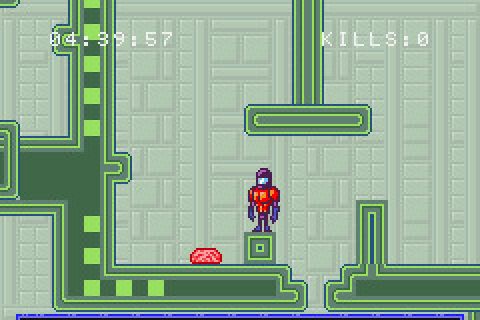
I recently wanted an easy way for people to play some of my older Game Boy Advance games directly in the browser.
The games were already finished, and the source code was already available, but asking someone to download a ROM and configure an emulator adds unnecessary friction. I wanted something simpler: click a link and start playing.
I ended up using EmulatorJS, GitHub Actions, and GitHub Pages. The setup turned out to be surprisingly simple.
Running a GBA ROM with EmulatorJS
The page needed to run a GBA game is very small.
For each game, I use an index.html similar to this:
<html>
    <head>
        <!--HTML file auto generated using EmulatorJS codehelper-->
        <style>
            body, html {
                margin: 0;
                padding: 0;
            }
        </style>
    </head>
    <body>
        <div style="width:100%;height:100%;max-width:100%">
            <div id="game"></div>
        </div>

        <script>
            EJS_player = "#game";
            EJS_core = "gba";
            EJS_color = "#0064ff";
            EJS_startOnLoaded = true;
            EJS_pathtodata = "https://cdn.emulatorjs.org/stable/data/";
            EJS_gameUrl = "game.gba";
        </script>

        <script src="https://cdn.emulatorjs.org/stable/data/loader.js"></script>
    </body>
</html>
There are only a few important values.
EJS_player tells EmulatorJS where to place the emulator:
EJS_player = "#game";EJS_core selects the system being emulated:
EJS_core = "gba";EJS_startOnLoaded starts the emulator automatically:
EJS_startOnLoaded = true;EJS_pathtodata points to the EmulatorJS runtime:
EJS_pathtodata = "https://cdn.emulatorjs.org/stable/data/";And EJS_gameUrl points to the ROM:
EJS_gameUrl = "game.gba";If the ROM is in the same directory as index.html, that is almost everything needed.
Organizing the Web Build
I keep the files that will eventually be published inside a public directory.
My project currently looks like this:
public/
├── battleship
│   ├── battleship.gba
│   └── index.html
├── index.html
├── megatroid
│   ├── index.html
│   └── megatroid.gba
├── pong
│   ├── index.html
│   └── pong.gba
├── previews
│   ├── battleship.png
│   ├── megatroid.png
│   ├── pong.png
│   └── tetris.png
└── tetris
    ├── index.html
    └── tetris.gba
Each game has its own directory containing its ROM and its EmulatorJS page.
The root index.html acts as a simple launcher for all of the games. I also added preview images so people can see what each game looks like before starting it.
The ROM files themselves are generated by the normal game builds and copied into public as part of the publishing process.
For example, my publish Make target does this:
publish:
	cp battleship/battleship.gba public/battleship
	cp megatroid/megatroid.gba public/megatroid
	cp pong/pong.gba public/pong
	cp tetris/tetris.gba public/tetris
This means public/ always contains the complete static website that I want to deploy.
Automating the Build and Deployment
I also wanted the browser versions to update automatically whenever the games changed.
The GitHub Actions workflow builds the ROMs inside the same devkitPro container I use for development:
- name: Build roms (Debug)
  uses: nonameentername/docker-run-action@v3
  with:
    image: werner/devkitpro
    options: -v ${{ github.workspace }}:${{ github.workspace }} --workdir ${{ github.workspace }}
    run: |
      make build
After the ROMs are built, make publish prepares the contents of the public/ directory.
The resulting web build is then published to the gh-pages branch:
- name: Publish to gh-pages
  uses: peaceiris/actions-gh-pages@v4
  with:
    github_token: ${{ secrets.GITHUB_TOKEN }}
    publish_branch: gh-pages
    publish_dir: ./public/
One useful detail is that the public directory itself does not become part of the deployed URL.
On the source branch I have:
public/
├── index.html
├── battleship/
├── megatroid/
├── pong/
└── tetris/
But the contents of public/ are published to the root of gh-pages, so the resulting URLs look like:
/battleship/
/megatroid/
/pong/
/tetris/
rather than:
/public/battleship/The full workflow also runs builds for pull requests, while publishing only happens from main. That lets changes be validated before they affect the live site.
Nintendo DS Games
The same approach can also be used for Nintendo DS games.
EmulatorJS supports different emulator cores, so the general structure stays the same. The main changes are the selected core and the ROM filename.
That means the deployment strategy does not really care whether the project is a GBA game or a Nintendo DS game.
Why I Like This Approach
The biggest benefit is removing friction.
Without the browser version, someone interested in one of these games would have to:
- Download the ROM.
- Find an emulator.
- Configure the emulator.
- Load the ROM.
With this setup they can just click a link.
It also means my older projects remain easy to discover and try even years after they were originally created.
The deployment is simple too. There is no custom backend and no application server. EmulatorJS runs the game in the browser, while GitHub Pages serves the static files.
Once the GitHub Actions workflow is in place, I can continue working on the games normally and the browser versions are updated automatically after changes are merged.
A Note About ROM Distribution
Only publish ROMs that you have the legal right to distribute.
In my case, these are games that I created myself, so I can include the ROM files directly with the website.
For games or ROMs owned by someone else, the situation would obviously be different.
Conclusion
Getting my Game Boy Advance games running in the browser ended up requiring very little custom code.
EmulatorJS handles the emulation, a small HTML file embeds each game, and GitHub Pages provides the static hosting.
Adding GitHub Actions makes the workflow even nicer because publishing becomes part of the normal development process rather than a separate manual task.
For older indie game projects in particular, I think this is a really nice way to make the work easier to discover, play, and preserve.
If you’d like to support my work and get project updates like this earlier, you can follow me on Patreon.